


Motorola vt2442 Voice Gateway
Motorola Voice Gateway
Description of Lights- VT2442

Phone 1, 2 Indicates the status of phone line one and optional line two, respectively:
- Solid green � The phone for that line is on hook, registered with Vonage, and ready for use.
-
Blinking green � The phone for
that line is ringing or off hook.
Blinking orange � You have voice mail. - Both blinking rapidly in unison with the Power light � The voice gateway is downloading a firmware upgrade. Do not unplug or disconnect your voice gateway while it is downloading firmware.
- Off � The phone line is not registered for Vonage service. You cannot use it for phone calls.
During a normal start-up, it lights in the following sequence:
- Blinking once � You have turned the voice gateway on by plugging it in to AC power.
- Blinking twice � The voice gateway is retrieving its IP address.
- Blinking three times � The voice gateway is downloading its configuration file from Vonage.
- Blinking four times � The voice gateway is connecting to the Vonage server.
- Blinking rapidly in unison with the Phone 1 and 2 lights (This may or may not happen.) � The voice gateway is downloading a firmware upgrade. Do not unplug or disconnect your voice gateway while it is downloading firmware.
-
Solid green � The voice
gateway has successfully registered with Vonage. If a firmware
upgrade was
needed, it has been successfully completed.
.
Back Panel of the Motorola VT2442 Voice Gateway
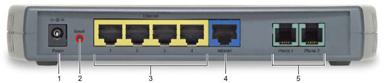
- 1 Power Connector for a 12 V adapter that you plug into an AC power outlet.
- 2 Reset Press to restart the VT2442; you can also restart your voice gateway using its graphical user interface (GUI).
- 3 Ethernet ports 1, 2, 3, 4 for up to four computers or other devices.
- 4 Internet Blue Ethernet port to your cable or DSL modem.
- 5 Phone Line Green ports for phones one and two. If you subscribe to only one phone line typically you must connect your phone to the Phone 1 port.
Instructions to set PPPoE on a Motorola VT2442 Voice Gateway.